

The shift toward distributed networks
Managing a network for a remote team isn't just about home Wi-Fi anymore. I'm seeing more teams spread across four or five continents, each dealing with local ISP outages and varying latency. You can't just set up a standard office firewall and call it a day; the hardware and software need to handle a dozen different entry points at once.
The trends driving this change are clear: the continued adoption of cloud services, the proliferation of mobile devices, and the increasing reliance on real-time communication tools. These factors put a strain on traditional network architectures and require organizations to embrace new technologies and strategies. Ignoring these changes is a real risk.
Security is paramount. A distributed workforce expands the attack surface, making organizations more vulnerable to cyber threats. Proactive network management, with a strong focus on security, is no longer optional – it’s essential for protecting sensitive data and maintaining business continuity. A reactive approach simply won’t cut it in the current threat environment.
Monitoring tools for 2026
Effective network monitoring is the foundation of any successful remote team network management strategy. In 2026, the emphasis is on tools that provide deep visibility into network performance, identify potential issues before they impact users, and offer actionable insights for troubleshooting. The old ways of just watching bandwidth usage aren't enough.
Tools like SolarWinds Network Performance Monitor continue to be popular, offering a comprehensive suite of features for monitoring network devices, applications, and traffic. PRTG Network Monitor is another strong contender, known for its flexible sensor-based licensing and user-friendly interface. Datadog has emerged as a leading choice for organizations that prioritize cloud-based monitoring and integration with other DevOps tools.
However, the real value of these tools lies in how they address specific remote team problems. For example, a team member in Tokyo experiencing consistent latency issues can be quickly diagnosed using these tools, pinpointing whether the problem lies with their local network, the internet connection, or a server in a different region. Identifying bandwidth hogs – those users or applications consuming excessive resources – also becomes much easier.
SD-WAN for distributed teams
Software-Defined Wide Area Networking, or SD-WAN, is rapidly becoming a critical technology for organizations with distributed teams. Traditional WAN architectures were designed for a world where most applications resided in a central data center. That’s simply not the case anymore. SD-WAN addresses this challenge by intelligently routing traffic based on application requirements and network conditions.
SD-WAN is a practical choice because it prioritizes Zoom calls over background file backups automatically. It also saves money. Instead of paying for expensive MPLS circuits, we use standard internet connections without losing the stability needed for real-time work. It makes adding a new branch or remote hub a matter of hours rather than weeks of ISP coordination.
Key players in the SD-WAN space include VMware, Cisco, and Fortinet. While the technical details can be complex, the core idea is simple: SD-WAN simplifies network management for organizations with employees scattered around the globe, providing a more efficient and reliable network experience.
- Prioritizes real-time traffic like video calls over background tasks
- Reduced costs
- Increased agility
Zero trust and remote access
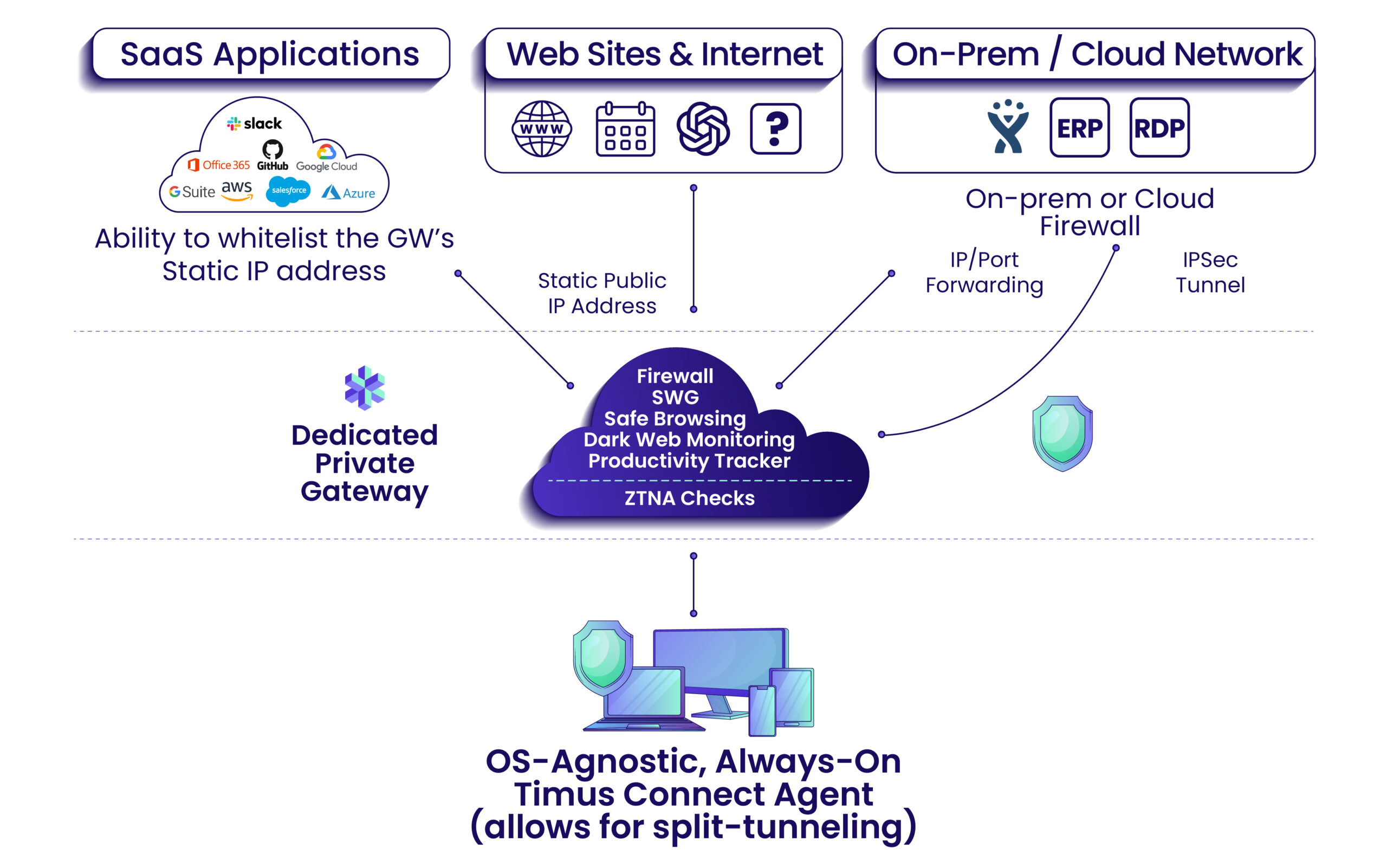
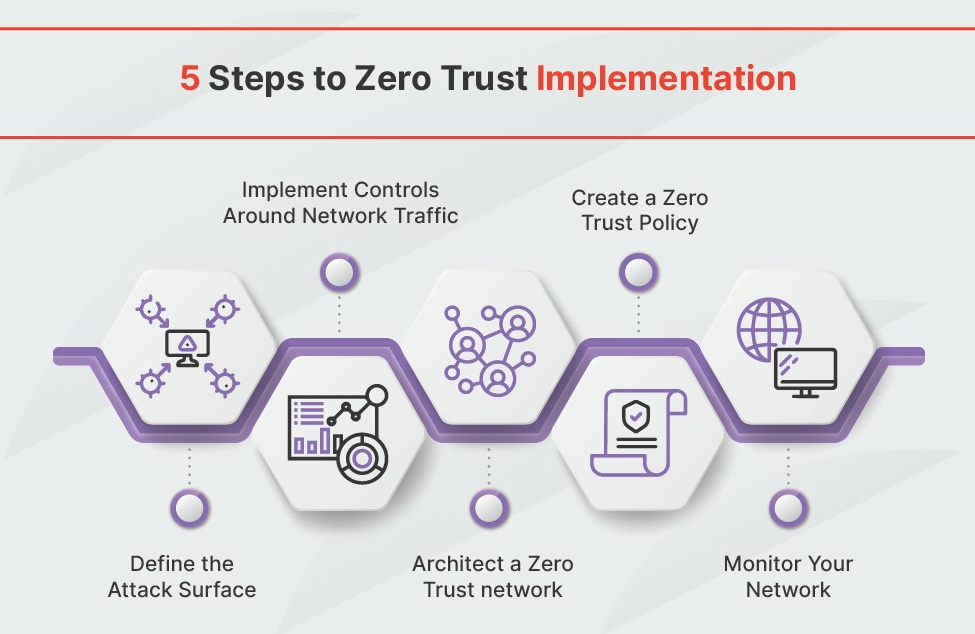
Securing remote access is a top priority for organizations in 2026, and Zero Trust Network Access (ZTNA) is quickly becoming the preferred approach. Traditional VPNs, while still widely used, have inherent security limitations. They grant broad network access, which can be exploited by attackers who compromise a single user account. ZTNA, on the other hand, operates on the principle of 'never trust, always verify'.
Instead of granting access to the entire network, ZTNA provides granular access to specific applications and resources, based on user identity, device posture, and other contextual factors. This significantly reduces the attack surface and minimizes the impact of a potential breach. It’s about giving users access to only what they need, and nothing more.
ZTNA isn’t just a technology; it’s a security philosophy. It requires a fundamental shift in how organizations think about network access. The benefits are clear: reduced attack surface, improved user experience (compared to clunky VPNs), and enhanced compliance. Solutions like Cloudflare Access and Zscaler Private Access are leading the way in ZTNA adoption.
A roundup of management software
According to research from blog.domotz.com, several network management software solutions stand out for their suitability for remote teams in 2026. These tools prioritize features like automatic discovery, remote management capabilities, and integrations with popular collaboration platforms.
Domotz is a strong contender, offering a comprehensive solution for discovering, monitoring, and managing network devices. Its automatic discovery feature provides full context visibility, while its remote management tools enable faster issue resolution. Auvik Networks is another popular choice, known for its ease of use and focus on MSPs. SolarWinds, as mentioned previously, remains a powerful option for larger organizations.
What sets these tools apart for remote teams is their cloud-based management. This allows IT staff to manage networks from anywhere, without the need for on-premises infrastructure. Integration with collaboration tools like Slack and Microsoft Teams is also crucial, enabling seamless communication and incident response. The ability to quickly diagnose and resolve network issues is paramount when dealing with a distributed workforce.
Network Management Tools Comparison for Remote Teams - 2026
| Tool Name | Ease of Use | Scalability | Security Features | Remote Access Support | Reporting & Analytics |
|---|---|---|---|---|---|
| SolarWinds Network Performance Monitor | Medium | High | High | High | High |
| PRTG Network Monitor | Medium | Medium | Medium | High | Medium |
| Datadog Network Performance Monitoring | Medium | High | Medium | High | High |
| Zabbix | Low | High | Medium | Medium | Medium |
| Nagios XI | Low | Medium | Medium | Medium | Medium |
| ManageEngine OpManager | Medium | Medium | High | High | Medium |
| Paessler PRTG | Medium | Medium | Medium | High | Medium |
Illustrative comparison based on the article research brief. Verify current pricing, limits, and product details in the official docs before relying on it.
Automation & Scripting: Reducing Manual Work
Automation and scripting are essential for scaling network management efforts, especially for remote teams. Manually configuring network devices, monitoring performance, and troubleshooting issues is simply not sustainable in a distributed environment. Automation frees up IT staff to focus on more strategic tasks.
Tools like Ansible provide a powerful framework for automating network configuration and management. Python scripting can also be used to develop custom automation solutions tailored to specific needs. The key is to identify repetitive tasks and automate them whenever possible. This could include tasks like automatically creating user accounts, configuring firewall rules, or deploying software updates.
The benefits of automation are significant: reduced errors, increased efficiency, and faster response times. By automating mundane tasks, IT staff can focus on proactive network management and strategic initiatives.
Network Security Best Practices for Remote Teams
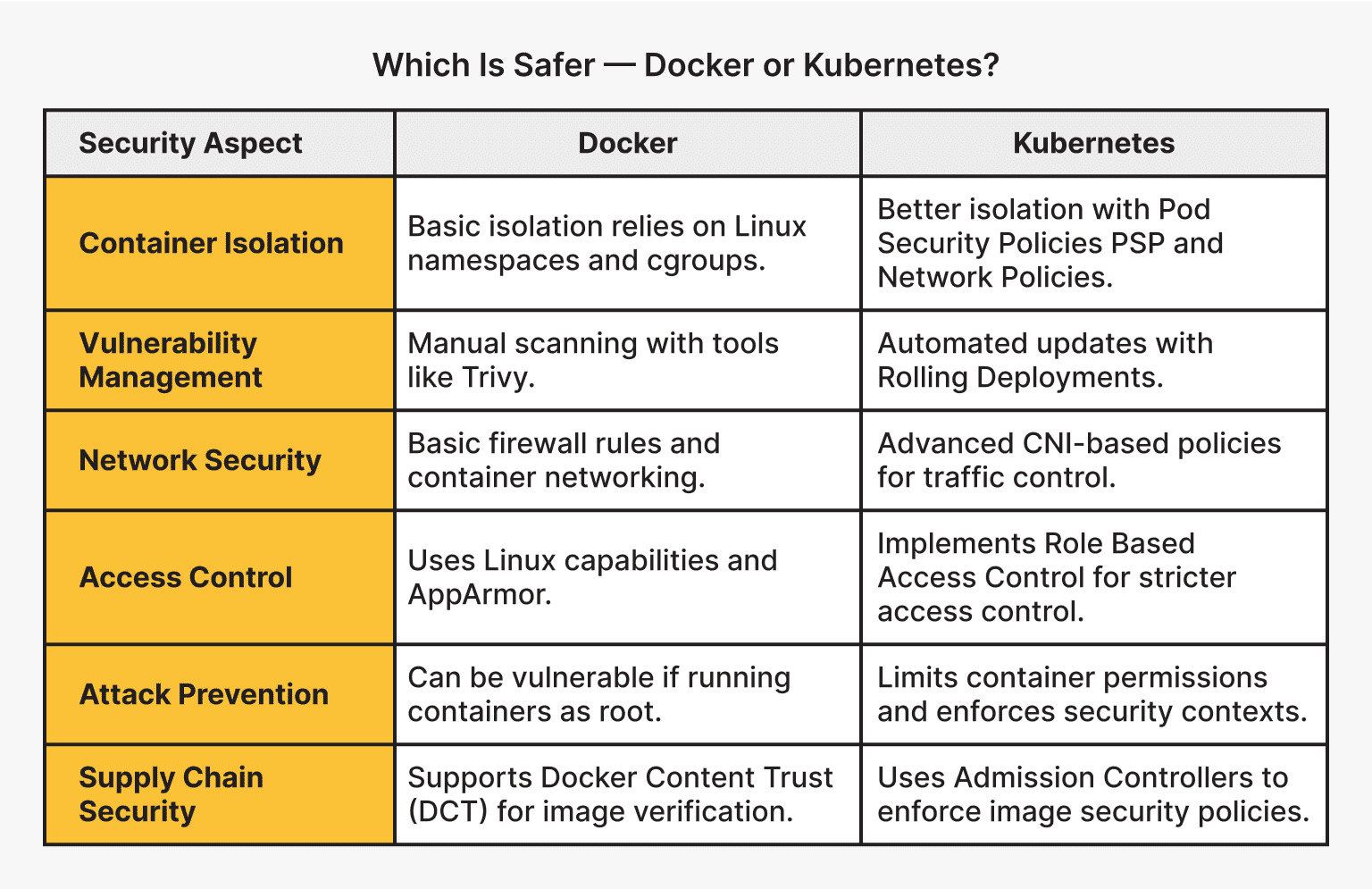
A layered security approach is crucial for protecting remote teams. Strong passwords and multi-factor authentication (MFA) are fundamental. MFA adds an extra layer of security by requiring users to verify their identity through a second factor, such as a code sent to their mobile device. Regular security audits are also essential for identifying vulnerabilities and ensuring that security controls are effective.
Employee training is another critical component. Employees need to be aware of the latest security threats and how to protect themselves from phishing attacks, malware, and other online risks. The CompTIA Network+ 2026 guide emphasizes the importance of security awareness training for all employees. It’s not enough to have the best security tools; you need to ensure that your employees are using them correctly.
Implementing a robust patch management process is also vital. Regularly patching software and firmware helps to address known vulnerabilities and prevent attackers from exploiting them. Finally, consider using a virtual private network (VPN) to encrypt network traffic and protect sensitive data.

No comments yet. Be the first to share your thoughts!