

Why linux for machine learning
Machine learning engineers choose Linux for control. While other systems hide the kernel, Linux lets you modify the underlying system to squeeze every bit of performance out of your hardware during training runs.
Package management systems like apt (Debian/Ubuntu), yum (Fedora/CentOS), and pacman (Arch) streamline the installation and management of the numerous libraries and frameworks required for AI work. The command line interface, while initially daunting to some, offers unparalleled flexibility and automation capabilities. Combine this with a remarkably active community, and you have an environment primed for innovation.
Hardware compatibility is another significant benefit. Linux generally offers better support for a wider range of hardware, including GPUs, which are crucial for accelerating machine learning workloads. The ability to fine-tune the kernel and drivers to maximize performance is something that's often difficult or impossible on other operating systems. It’s not simply about having options, but about having control.
The best distributions for 2026
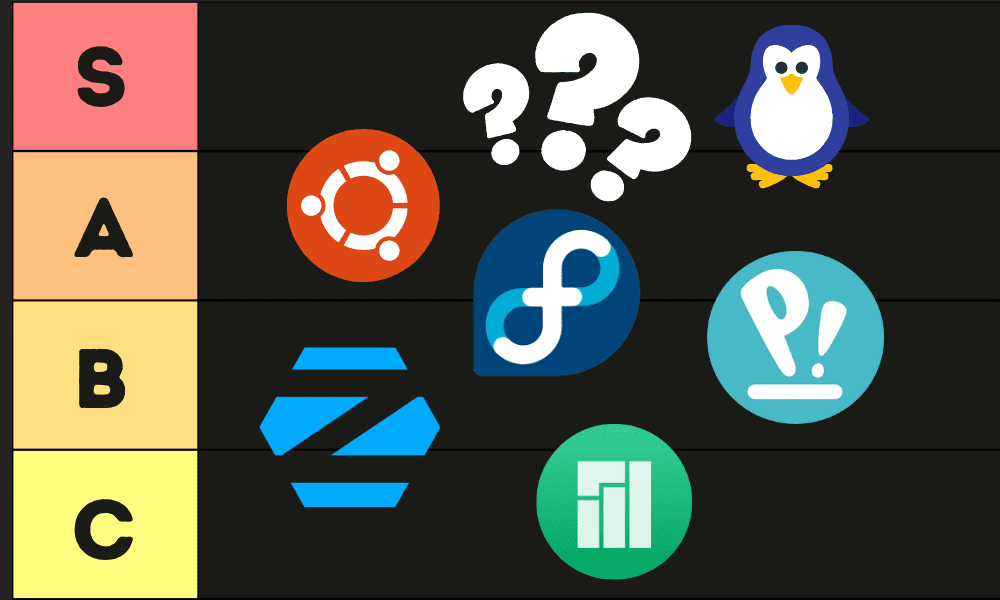
Choosing the 'best' distro depends heavily on your experience level and specific needs. However, several distributions stand out as particularly well-suited for AI development in 2026. Here's a look at seven contenders, ranked with an eye towards ease of use, performance, and community support.
Ubuntu remains a popular choice, largely due to its massive community and extensive software repositories. It’s generally easy to get started with, but recent changes regarding Snap packages have drawn criticism. Fedora is gaining traction, offering a more cutting-edge experience with frequent updates and a strong focus on free and open-source software. The trade-off is potential instability.
Debian, the foundation for Ubuntu, provides a rock-solid stable base, but may lack the latest software versions. Pop!_OS, built by System76, is tailored for developers and gamers, and boasts excellent NVIDIA driver support out of the box. This makes it a strong contender for GPU-intensive machine learning tasks.
Manjaro offers a user-friendly gateway to the Arch Linux ecosystem. It provides a rolling release model with access to the Arch User Repository (AUR), but with a more manageable installation and configuration process. Arch Linux itself is for experienced users who want complete control over their system, but requires significant technical expertise.
Finally, Nobara, a Fedora-based distro focused on gaming and content creation, is worth mentioning for its out-of-the-box multimedia support and generally good performance. It's a less common choice, but could be a good fit for developers who also enjoy gaming or multimedia work.
For each, consider the availability of pre-built packages for TensorFlow, PyTorch, and other essential frameworks. Ease of GPU driver setup is also critical. A strong community forum and readily available documentation can save hours of troubleshooting. Remember to weigh these factors against your own skill level and project requirements.
- Ubuntu has the largest community and widest software support, though Snap packages are a point of contention.
- Fedora: Cutting-edge software, strong open-source ethos, potential instability.
- Debian: Rock-solid stability, may lack latest software.
- Pop!_OS: Excellent NVIDIA support, well-tuned performance.
- Manjaro: User-friendly Arch-based distro, access to AUR.
- Arch Linux: Maximum customization, requires significant expertise.
- Nobara: Fedora-based, good multimedia support.
Ubuntu and the snap controversy
Ubuntu has long been the go-to Linux distribution for many, including AI developers. Its vast community means help is readily available, and the sheer number of software packages available through apt is a major advantage. The learning curve is relatively gentle, making it accessible to newcomers. However, Ubuntu isn't without its critics.
Recent changes surrounding the increased use of Snap packages have raised concerns among some users. Snaps can be slower to launch than traditional deb packages, and their sandboxed nature can sometimes create compatibility issues. There are also concerns about Canonical’s control over the Snap Store. These changes are definitely something to consider when choosing a distro for AI work.
Despite these criticisms, Ubuntu remains a viable option. The widespread adoption means you’re likely to find solutions to most problems quickly. The question is whether the convenience and community outweigh the potential drawbacks of Snap and the evolving direction of the distribution. It’s a situation worth monitoring closely.
Which Linux distro are you currently using or planning to use for AI and machine learning development in 2026?
As the AI development landscape evolves, so do the Linux distributions that support it. We want to hear from the Guide Techy community -- vote below and share your preference in the comments!
Fedora and Pop!_OS
Fedora is steadily gaining ground as a strong contender for AI development. Its commitment to free and open-source software aligns well with the ethos of the AI community. Fedora’s close ties to Red Hat also mean it benefits from enterprise-level stability and security updates. The downside is that its rapid release cycle can sometimes introduce instability.
Pop!_OS, developed by System76, is specifically designed for developers and creators. Its standout feature is its excellent NVIDIA driver support, which is often pre-configured and works flawlessly. This is a huge benefit for anyone doing GPU-accelerated machine learning. Pop!_OS also offers a clean and intuitive desktop environment.
I think Pop!_OS is a particularly strong contender for developers who rely heavily on NVIDIA GPUs. Fedora, on the other hand, might appeal to those who prefer a more bleeding-edge experience and a strong commitment to open-source principles. Ultimately, the best choice depends on your priorities and hardware configuration.
Arch and Manjaro
Arch Linux is the distribution for those who want complete control over every aspect of their system. It’s a minimalist distribution that requires significant technical expertise to install and configure. However, the reward is a highly optimized and customized system tailored to your exact needs. The Arch User Repository (AUR) provides access to a vast collection of community-maintained packages.
Manjaro offers a more accessible entry point to the Arch ecosystem. It provides a graphical installer and pre-configured desktop environments, making it much easier to get started. Manjaro still benefits from the AUR and the rolling release model of Arch, but with a more user-friendly experience.
The trade-off is that Manjaro adds a layer of abstraction that may not appeal to experienced Arch users. It’s a good choice for those who want the power of Arch without the steep learning curve. Arch Linux is really for the power users who want to build their system from the ground up.
Arch Linux vs. Manjaro: A Qualitative Comparison
| Feature | Arch Linux | Manjaro |
|---|---|---|
| Ease of Installation | Requires significant technical expertise and manual configuration. | User-friendly graphical installer simplifies the setup process. |
| Package Management | Uses pacman; offers flexibility but demands user responsibility for updates and dependencies. | Based on pacman but includes a graphical package manager and handles dependencies more automatically. |
| Customization | Highly customizable; allows for a completely tailored system, but requires considerable effort. | Offers a good degree of customization, with pre-configured desktop environments available. |
| Community Support | Large and active community, but geared towards experienced Linux users. | Friendly and helpful community, welcoming to beginners. |
| Stability | Rolling release model can sometimes lead to instability; requires proactive maintenance. | Offers both stable and testing branches, providing a balance between up-to-date software and system reliability. |
| Software Availability | Access to the Arch User Repository (AUR) provides a vast software selection. | AUR access is available, extending software options beyond official repositories. |
| System Updates | Updates are frequent and require manual intervention; potential for breakage if not managed carefully. | Updates are less frequent and managed through a graphical update manager, reducing the risk of issues. |
Illustrative comparison based on the article research brief. Verify current pricing, limits, and product details in the official docs before relying on it.
GPU drivers and hardware acceleration
GPU support is absolutely critical for AI development, and the ease with which you can get your NVIDIA or AMD GPU working correctly can make or break your experience. Pop!_OS consistently receives praise for its automatic NVIDIA driver support, often working flawlessly out of the box. This simplifies the setup process considerably.
Ubuntu generally has good NVIDIA driver support, but may require some manual configuration. Fedora also supports NVIDIA GPUs, but the process can be more involved. Arch Linux requires manual installation and configuration of drivers, which demands a good understanding of the system. Getting CUDA and ROCm, the respective SDKs from NVIDIA and AMD, installed and configured correctly is also crucial.
It's important to check the documentation for each distribution to understand the specific steps required for your GPU model. Driver issues can be a major source of frustration, so choosing a distro with good support for your hardware is a wise decision. A smooth driver experience translates directly into faster training times and increased productivity.
Essential libraries
Regardless of the distro you choose, you'll need to install essential AI/ML packages like TensorFlow, PyTorch, scikit-learn, NumPy, and pandas. Most distros make this relatively straightforward using their package managers. Ubuntu and Debian use apt, Fedora uses dnf, and Arch Linux uses pacman.
TensorFlow and PyTorch often have pre-built packages available, simplifying the installation process. However, you may need to install additional dependencies. It’s also worth exploring the availability of GPU-accelerated versions of these packages to take full advantage of your hardware. Checking the official documentation for each package is always a good idea.
Distro-specific optimizations exist but vary. Intel’s Clear Linux, for instance, often outperforms Ubuntu in AVX-512 workloads, though it lacks the broad package support found in the Debian ecosystem. Most engineers stick to standard package managers to avoid dependency hell.
Essential Hardware for AI Development Workstations

Powered by the NVIDIA Ada Lovelace architecture · 16384 CUDA cores for massive parallel processing · 24GB GDDR6X memory for large datasets and complex models
This GPU offers unparalleled processing power and memory capacity, essential for accelerating deep learning training and inference.

64GB capacity for handling large datasets in memory · 6000MHz speed with CL30 latency for rapid data access · DDR5 technology for increased bandwidth and efficiency
Ample high-speed RAM is vital for loading large datasets and models into memory, preventing bottlenecks during AI development.

2TB capacity for storing large datasets and models · PCIe Gen 4 NVMe interface for ultra-fast read/write speeds · Optimized for demanding applications and large file transfers
Rapid storage access significantly reduces data loading times, speeding up development workflows and model iteration.

1000W continuous power output to support high-end components · ATX 3.1 and PCIe 5.1 ready for next-generation hardware compatibility · Fully modular design for clean builds and improved airflow
A robust and efficient power supply is critical to reliably power demanding AI hardware, ensuring system stability.

Dual-tower heatsink design for superior heat dissipation · Two 140mm fans for high airflow and quiet operation · Proven performance for sustained heavy loads
Effective CPU cooling is essential to prevent thermal throttling during long, intensive AI computation tasks.
As an Amazon Associate I earn from qualifying purchases. Prices may vary.
No comments yet. Be the first to share your thoughts!