

Why Linux powers security workflows
Linux is the operational backbone of cybersecurity and network management. Most security tools, from packet analyzers to vulnerability scanners, are built natively for Unix-like environments. This isn't just tradition; it's about performance and compatibility. Running these tools on Windows or macOS often requires virtualization or emulation layers that introduce latency and complexity.
Beyond tool availability, Linux offers granular control over the operating system. Security professionals need to modify kernel parameters, manage firewall rules at the lowest level, and isolate network interfaces without interference from background services. This level of access is essential for hardening systems and conducting deep forensic analysis.
The open-source nature of Linux also means transparency. When you're dealing with sensitive network data, knowing exactly what code is running on your machine is non-negotiable. The community-driven development model ensures that vulnerabilities are patched quickly, and the modular architecture allows you to strip away unnecessary components, creating a lean, secure environment tailored for specific tasks.
5 Best Linux Distros for Network Management and Cybersecurity Pros
Selecting the right Linux distribution is critical for professionals managing complex network infrastructures and executing precise security audits. This guide evaluates five top-tier distros based on their specific toolchains, kernel stability, and packet analysis capabilities, ensuring you choose a platform built for enterprise-grade operations rather than general computing.
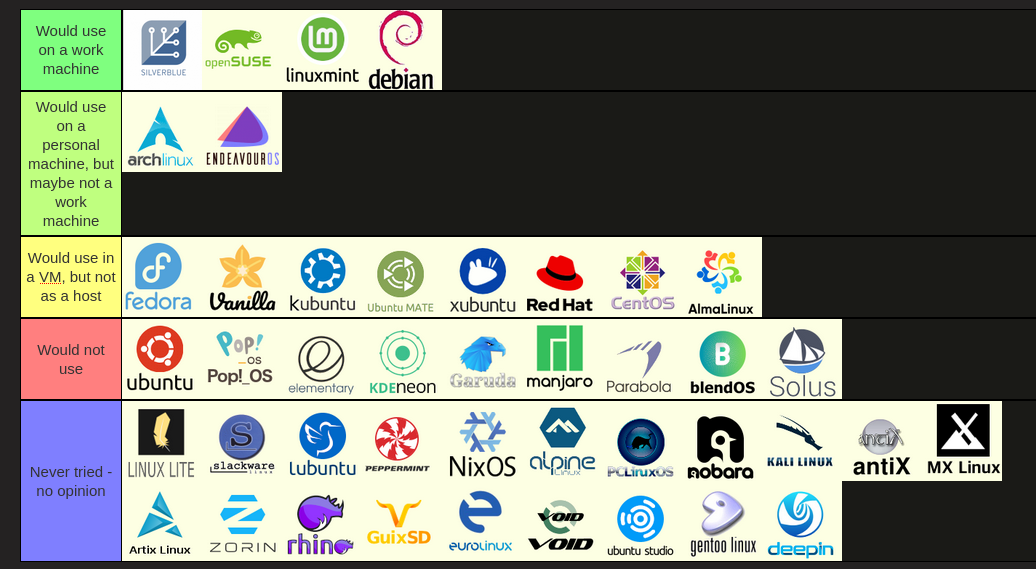
1. Kali Linux for penetration testing
Kali Linux remains the industry standard for penetration testing, offering over 600 pre-installed tools for vulnerability assessment and ethical hacking. Its rolling release model ensures access to the latest exploits and security patches, making it indispensable for professionals conducting comprehensive network security audits and red-team operations.

2. Parrot Security OS for digital forensics
Parrot Security OS provides a lightweight, privacy-focused environment ideal for digital forensics and reverse engineering. Its MATE desktop offers a streamlined workflow for analysts, while built-in tools like Autopsy and Volatility facilitate efficient evidence collection and memory analysis without the resource overhead of heavier distributions.

3. BlackArch Linux for advanced security research
BlackArch Linux serves as a specialized Arch-based repository containing over 2,800 security tools for advanced research and penetration testing. It allows professionals to install only the specific utilities required for complex vulnerability assessments, ensuring a customized environment that minimizes bloat while maximizing offensive security capabilities.

4. Fedora Security Lab for network analysis
Fedora Security Lab offers a robust, GNOME-based environment tailored for network analysis and security testing. It includes powerful tools like Wireshark and Nmap, providing a stable, enterprise-grade platform for professionals who require reliable network monitoring and packet analysis without the complexity of maintaining a custom-built security distribution.

5. Pentoo Linux for live security auditing
Pentoo Linux is a hardened, Gentoo-based distribution designed specifically for live security auditing and penetration testing. It features a custom kernel with grsecurity and PaX patches, providing enhanced protection against kernel exploits while offering a comprehensive suite of security tools for on-the-fly network assessments and vulnerability scans.

Essential tools in each distro
The true value of a cybersecurity or network management Linux distribution lies in its pre-installed software suites. These tools are curated to work together, reducing the time spent on configuration and allowing professionals to focus on analysis. Each distro offers a distinct flavor of security and networking utilities, tailored to specific operational needs.
Kali Linux
Kali Linux is the industry standard for penetration testing, featuring over 600 pre-loaded tools. Its core strength is the breadth of its offensive security arsenal. Users gain immediate access to Metasploit for exploit development, Nmap for network discovery and security auditing, and Wireshark for deep packet inspection. The distribution also includes specialized suites like Aircrack-ng for wireless network analysis and Burp Suite for web application security testing. This comprehensive collection makes it ideal for security professionals who need a one-stop shop for vulnerability assessment and network scanning.
Parrot Security OS
Parrot Security OS offers a more streamlined approach, focusing on efficiency and a lightweight desktop environment. It includes essential tools for penetration testing and digital forensics without the bloat of Kali. Key utilities include Hashcat for password cracking, John the Ripper for cryptanalysis, and Autopsy for digital forensics. For network management, it provides Nmap and Wireshark, along with Tor for anonymous browsing. Parrot is particularly favored by those who need a responsive system for daily driving alongside security tasks, offering a balanced toolkit for both offensive security and general system administration.
BlackArch
BlackArch is an Arch Linux-based distribution designed specifically for penetration testers and security researchers. It distinguishes itself with the largest repository of security tools, containing over 2,800 utilities. Unlike Kali, which comes with a curated set, BlackArch allows users to install tools individually or in groups. This flexibility is useful for specialists who need specific, niche tools for advanced vulnerability assessment. It includes all standard tools like Metasploit and Nmap, but also offers deep-dive utilities for reverse engineering, malware analysis, and exploit development. Its rolling release model ensures that tools are always up-to-date with the latest security patches and features.
How to choose your base system
Selecting the right Linux distribution for network management and cybersecurity requires balancing hardware constraints with tool availability. Your operating system is the foundation of your security stack; choosing poorly limits your ability to run essential monitoring or penetration testing tools effectively.
Assess your hardware capabilities
Cybersecurity workflows often demand significant resources. Running virtual machines for isolated testing environments or compiling custom kernels requires ample RAM and CPU power. If you are working with older hardware or limited storage, prioritize lightweight distributions like Alpine Linux or minimal installs of Debian. For modern workstations with 16GB of RAM or more, heavier desktop environments on Ubuntu or Fedora provide better graphical tool integration.
Match your experience level
Your comfort with the Linux command line dictates your learning curve. Beginners should start with Ubuntu or Linux Mint, which offer extensive documentation and large community support for troubleshooting. Experienced administrators comfortable with manual configuration may prefer Arch Linux or Gentoo, which provide granular control over system services and security policies but require deeper technical knowledge to maintain.
Define your security needs
Specific use cases drive distribution choice. For anonymity-focused tasks, Tails provides a live operating system that routes all traffic through Tor. For comprehensive security auditing and penetration testing, Kali Linux or Parrot OS come pre-loaded with hundreds of specialized tools. If you need a stable, long-term support environment for server management, Debian Stable or RHEL-based systems like Rocky Linux offer reliability over bleeding-edge features.


As an Amazon Associate, we may earn from qualifying purchases.
No comments yet. Be the first to share your thoughts!